
Smart Task Management
Plan, assign, and track work across lists, boards, and calendars so every project stays on schedule.
Platform
The work your team already does — tasks, chat, calendar, and AI — with limits your platform owner can actually control.
Plan, assign, and track work across lists, boards, and calendars so every project stays on schedule.
Mention AI teammates in chat and tasks. They draft, summarize, and chase work so your team can move faster.
Mentions, assignments, and channel activity land in one inbox, so nothing important is missed.
Connect the Google account you already use. Personal tasks stay in step with your calendar in both directions.
Talk in project channels or a private thread. Messages arrive live, and each workspace keeps its own conversations.
Platform owners set AI, email, and Calendar limits per workspace, so shared infrastructure stays predictable.
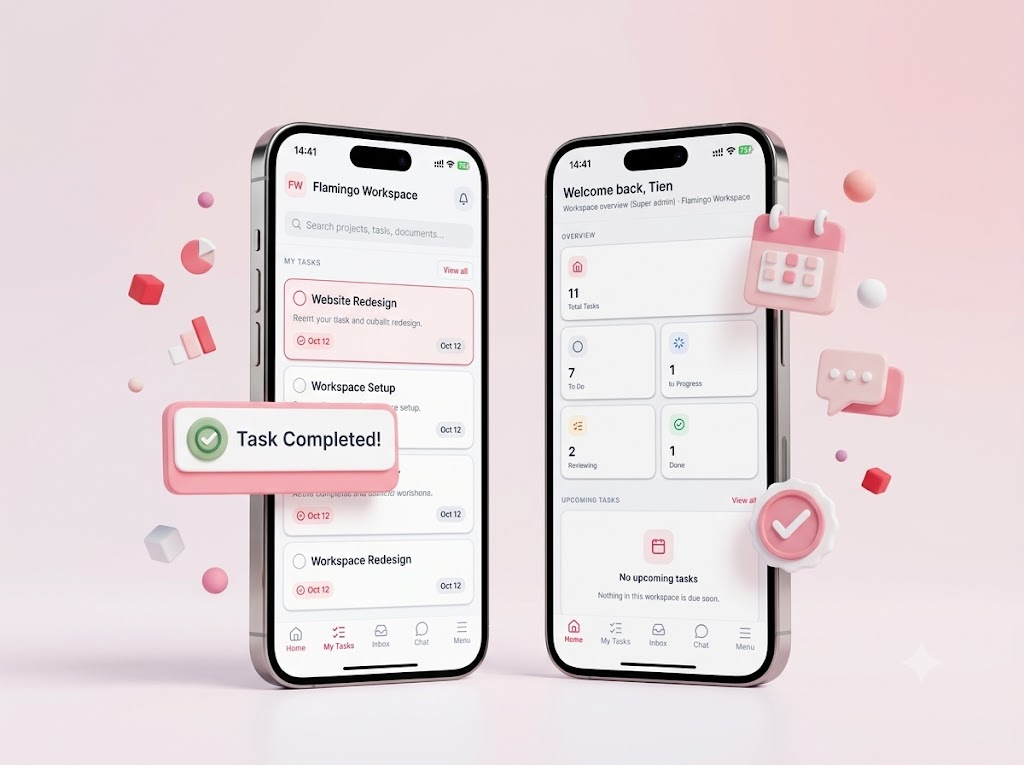
Seamless Mobile Experience
Never miss a beat with the Flamingo Workspace mobile app. Get real-time push notifications, create tasks on the go, and track project progress with just a tap. 100% real-time synchronization with your web dashboard.
AI coworkers
Custom AI agents sit inside the work, not in a separate chat window. Mention one with @ in a task or a channel thread and it drafts, summarizes, or runs the next step while the rest of the team stays in the same conversation.
Security
Every team gets its own workspace. Project boards, settings, and direct messages belong to that tenant only. Membership in one workspace never opens another, and every read and write is checked against the workspace in the URL.
Platform owners
Managed infrastructure means each workspace uses the platform’s mail, Calendar, and AI fleet without configuring its own. You turn features on, set a usage allowance, and watch consumption from one place.
FAQ
AI is metered per workspace, not per seat. The platform owner turns AI on and sets a usage allowance (or leaves it unlimited). Each completed coworker call counts against that workspace. When the allowance is used up, or AI is turned off, new calls wait until the owner raises the limit. Welcome and system mail are not charged to a workspace.
Yes. A workspace is a tenant. Projects, settings, and direct messages are stored and authorized for that workspace only. You can belong to many workspaces, and each one has its own role. Opening one workspace does not grant access to another.
Yes, when Google Calendar is enabled for your workspace. You connect the Google account you already use, and personal tasks sync both ways with that calendar. The platform hosts the Google connection, so your workspace does not store its own client secret. If Calendar is off, ask the platform administrator to enable it.
Create a workspace, invite your team, and keep tasks, chat, and AI coworkers in one place.
Start your Workspace